A successful corporate event live streaming setup requires careful planning, robust equipment, and a skilled crew. Focus on defining your goals, assessing the venue, and assembling a professional team
Setting up for a corporate event live stream involves much more than just hitting 'record' on a camera; it's a multi-faceted production requiring careful planning, the right gear, and an experienced team.
As an event marketing lead, you're tasked with making your corporate event accessible and engaging, whether for a global sales kickoff, an investor summit, or an internal town hall. A professional live stream extends your reach and delivers your message with impact. But getting it right means understanding the workflow, from pre-production to post-event delivery. Here’s a step-by-step guide to building a solid corporate event live streaming setup.
Your Live Streaming Workflow: From Concept to Broadcast
Live streaming isn't just about the 'live' moment; it's a comprehensive project that benefits from a structured approach. Think of it like any other major event production – you need a clear vision, the right resources, and a detailed plan.
Define Your Goals and Audience
Before you even think about cameras, ask yourself: Why are we live streaming this event? And for whom? The answers dictate everything from equipment choices to platform strategy.
- Internal Communications: Are you broadcasting to remote employees for an all-hands meeting or training? The focus might be on clear audio, presentation slides, and interactive Q&A.
- External Marketing/PR: Is this a product launch, a keynote address, or a thought leadership panel meant for customers, prospects, or the media? You'll need broadcast-quality visuals, polished graphics, and potentially multiple camera angles.
- Hybrid Events: Are you serving both an in-person and a remote audience? This often requires a more complex setup to ensure both experiences are equally engaging.
- Sponsor Value: If sponsors are involved, how will their branding be incorporated into the stream? This impacts graphics packages and on-screen real estate.
Understanding these objectives early helps you articulate your needs to a production partner. It’s the first step in creating a solid plan for video coverage for a corporate event, ensuring every technical decision aligns with your strategic goals.
Assess Your Venue & Connectivity
The physical location of your event is a critical factor for live streaming. A thorough site survey is non-negotiable.
- Internet Connectivity: This is paramount. You need reliable, dedicated upload bandwidth – not shared Wi-Fi. We're talking hard-wired Ethernet, preferably redundant connections. For a high-quality 1080p stream, plan for at least 10-20 Mbps *upload* speed. For 4K, significantly more. Always test the speed at the exact location where your encoder will be.
- Power: Adequate power outlets are essential for cameras, lighting, sound equipment, encoders, and monitors. Don't rely on a single circuit.
- Lighting: Existing venue lighting might not be sufficient or flattering. You'll likely need supplemental lighting for presenters, stage, or interview areas to ensure a professional look.
- Acoustics: Large, echoey rooms or noisy environments can destroy your audio quality. Identify potential sound challenges and plan for solutions like lavalier microphones for presenters and careful placement of audience mics.
- Logistics: Where can cameras be positioned without obstructing views? Is there space for a control area for the technical director and crew? What are the load-in/load-out times?
Choose Your Equipment Stack
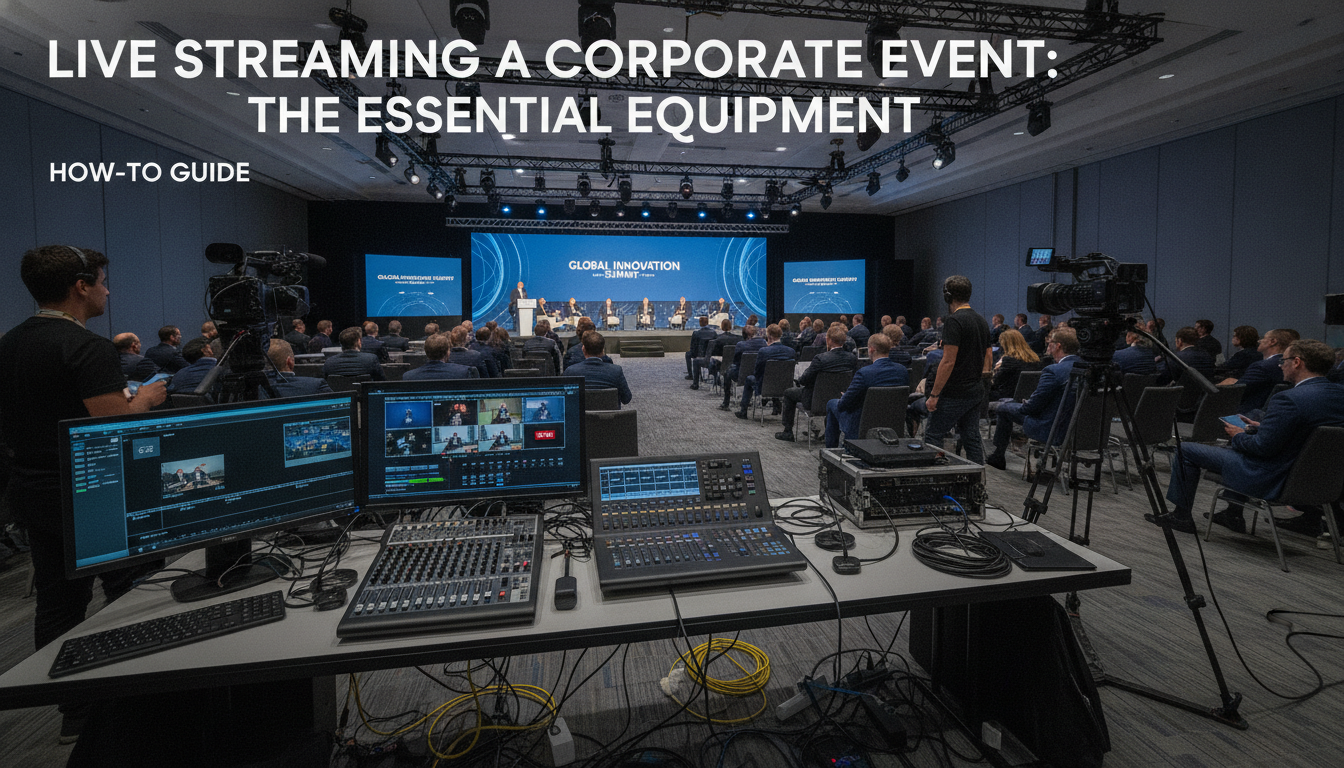
This is where the 'setup' really comes into play. A professional corporate event live streaming setup requires more than just a webcam.
- Cameras: For multi-camera setups, you'll want broadcast-quality cameras (e.g., Sony FX series, Blackmagic, or even higher-end RED/ARRI for cinematic looks if your budget allows). The number of cameras depends on the event's complexity – typically 2-4 for a conference with a stage and Q&A. Our Hylton Media Group event videography crew often recommends a minimum of two cameras for interviews and presentations to provide dynamic cuts.
- Lenses: High-quality lenses are crucial for sharp, clear images.
- Audio Equipment: This is often overlooked, but bad audio kills a live stream faster than bad video. You'll need lavalier mics for presenters, handheld mics for Q&A, and potentially boom mics or shotgun mics for ambient sound. A dedicated sound mixer is essential to control levels, apply equalization, and ensure pristine audio.
- Video Switcher: This allows the technical director to seamlessly switch between multiple camera feeds, pre-recorded videos, and presentation slides. Hardware switchers offer reliability and speed.
- Encoder: This device converts your video and audio signals into a streamable format (e.g., RTMP) and sends it to your streaming platform. Dedicated hardware encoders are more reliable than software encoders running on a computer for critical events.
- Monitoring: Multiple monitors are needed for the crew to see camera feeds, the program output, and chat/comments.
- Lighting Kit: Professional LED panels or fresnels to properly light your subjects and stage.
- Teleprompter: If presenters are reading scripts, a teleprompter ensures smooth delivery.
- Graphics Workstation: For lower thirds, full-screen graphics, sponsor logos, and animated intros/outros.
Bringing in a full crew with cinema-grade cameras, high-end lenses, and professional audio gear, like Hylton Media Group's camera crew for hire, ensures you have the technical horsepower and expertise needed.
Build Your Crew
Even with the best equipment, a live stream will fail without a skilled crew. This isn't a one-person job.
- Producer: Oversees the entire production, manages schedules, and liaises with the client.
- Technical Director (TD): Operates the video switcher, calling out camera cuts and managing transitions.
- Camera Operators: Each camera needs a dedicated operator to frame shots, adjust focus, and follow action.
- Audio Engineer: Manages all audio inputs, ensuring clear, balanced sound.
- Graphics Operator: Manages lower thirds, full-screen graphics, and video playback.
- Streaming Engineer: Monitors the encoder, internet connection, and stream health.
- Gaffer/Grip: Manages lighting and support equipment.
- Production Assistant (PA): Supports the crew with various tasks.
Hylton Media Group provides full crews – director, producer, DP, camera ops, sound, gaffer, grip – ensuring every role is covered by an experienced professional. This frees up your event marketing team to focus on the event itself, rather than the technical minutiae. If you're wondering how to hire a corporate video production company for this, finding one that offers a complete crew package is key.
Platform & Distribution Strategy
Where will your audience watch the stream?
- Public Platforms: YouTube Live, Facebook Live, LinkedIn Live. Great for reach, often free, but with limited branding control and potential for ads.
- Private/Professional Platforms: Vimeo Livestream, Wistia, custom white-label solutions. Offer more control, better analytics, and can be password-protected or embedded on your website. Ideal for internal comms or premium content.
- Event Platforms: Many virtual event platforms (e.g., Hopin, Bizzabo) integrate live streaming, offering features like virtual booths, networking, and analytics.
Consider your audience's technical comfort and your need for data or specific interactive features. Will you want to embed the stream directly on your event microsite? Will you need a chat function or live polling?
Pre-Production & Testing
This phase is crucial for preventing live day disasters. Never skip it.
- Full Technical Run-Through: Conduct a complete dry run with all presenters, graphics, and video assets. Test every camera, every microphone, every transition.
- Network Stress Test: Push your internet connection to its limits. Ensure it can handle the sustained upload required for your stream.
- Audio Check: Test all microphones for clarity, level, and feedback.
- Graphics Integration: Ensure all lower thirds, sponsor logos, and video playback cues are accurate and ready.
- Backup Plans: What happens if the internet goes out? What if a camera fails? Always have redundancies – a backup encoder, a secondary internet connection, or pre-recorded segments ready to roll.
Execution & Monitoring
On event day, the crew is focused on flawless execution.
- Live Management: The TD calls the shots, switching cameras and playing back content. The audio engineer keeps levels perfect. The streaming engineer monitors the stream's health, ensuring no drops or quality degradation.
- Audience Interaction: If you have a Q&A or chat, assign someone to monitor it and relay questions to presenters.
- Troubleshooting: Issues can arise. An experienced crew can quickly diagnose and resolve problems without interrupting the broadcast.
Post-Event Strategy & Delivery
The work doesn't end when the stream cuts. Maximize your content's lifespan.
- Video On Demand (VOD): Make the full event available for replay. This is crucial for those who couldn't attend live or want to revisit content.
- Highlight Reels & Cut-downs: Create shorter, punchy versions of the event for social media, internal recaps, or marketing. This is also where you can create sizzle reels for sponsor recap decks, adding significant value.
- Analytics: Review viewership data, engagement metrics, and audience demographics to inform future events.
- Raw Footage/B-roll Handoff: Hylton Media Group can deliver raw footage or B-roll for your internal archives or future marketing efforts.
Don't Leave Your Live Stream to Chance
A corporate event live stream is a powerful tool for extending your brand's reach and impact. But it demands meticulous planning, professional-grade equipment, and a seasoned crew. Trying to DIY a complex live stream often leads to technical glitches, poor quality, and a diminished brand image.
Hylton Media Group specializes in corporate video production and event videography, including comprehensive live streaming solutions. From defining your goals to managing the entire technical setup and providing a full, experienced crew, we ensure your message is broadcast professionally and flawlessly. Let's make your next event a success, both in-person and online.
Ready to discuss your next corporate live stream? Book a 30-min discovery call with our team to scope your project.
FAQ